TK1971 Bangladesh App — Download

The TK1971 mobile app gives Bangladesh players direct access to 24,000+ games, bKash and Nagad payments, and a full sportsbook - all in one APK built for Android and iOS. The app loads faster than a browser, keeps your session stable on mobile data, and sends push notifications for live match updates. Registration takes under two minutes using your Bangladeshi mobile number. The app is not listed on Google Play - the official APK is available only from tk1971game.com or tk1971.org. iOS users get a fully optimised web app that works like a native install.
Why the TK1971 App Beats the Browser

Playing through a mobile browser works, but the TK1971 app solves three real problems that browser users face every day.

First, connection drops. When you switch from Wi-Fi to mobile data mid-session, a browser tab often reloads. The app maintains the session and picks up where you left off. Second, navigation speed. The app caches the game lobby locally, so categories like slots, live casino, and sports load without a full network round-trip. Third, payments. The deposit screen inside the app is a single tap from the home screen, with bKash VIP and Nagad VIP pre-selected.

Additional features exclusive to or faster in the app:

  • Biometric login - fingerprint or Face ID replaces typing your password each time
  • Push notifications for live cricket odds updates and promotion alerts
  • Home screen shortcut for one-tap access
  • App-only welcome bonus of 18 BDT for download plus Telegram join

The app supports the same account as the website. You log in with the same mobile number and password across both.

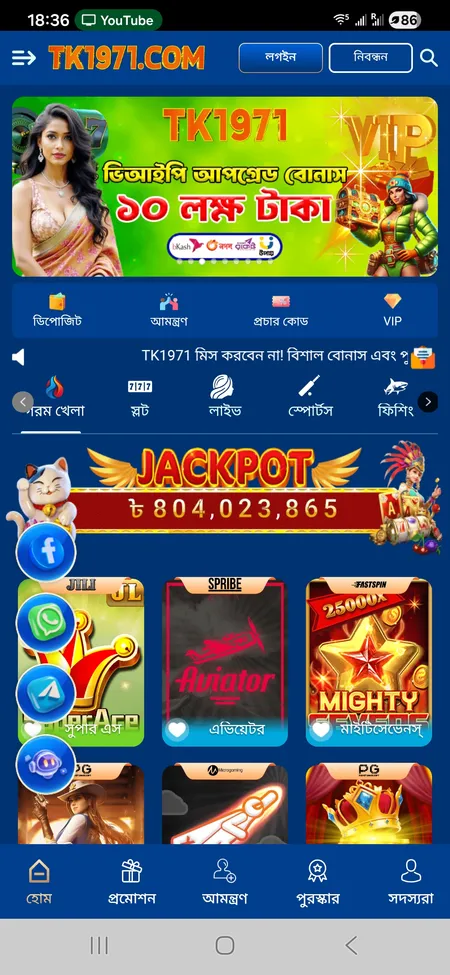
TK1971 app home screen with game categories

The main screen shows hot games, slots, live casino, sports and fishing tabs. The jackpot counter and deposit shortcut are visible at the top.

Visit TK1971 Official Site

How to Download the TK1971 APK for Android

Because Android blocks installations from outside Google Play by default, you need to allow one setting before installing. The full process takes about three minutes.

Step-by-step Android install

  1. Open tk1971game.com or tk1971.org in your phone browser.
  2. Tap the app download banner or go to the dedicated download section.
  3. Tap the 'Android' button - the APK file (roughly 15-30 MB) will start downloading.
  4. When the download finishes, open the APK from your notifications or file manager.
  5. Android will show a prompt: 'Install unknown apps'. Tap 'Settings' and enable 'Allow from this source'.
  6. Return to the file and tap 'Install'.
  7. Once installed, open TK1971 and log in or register.

Common Android errors and fixes

Error Fix
'App not installed' Delete any older TK1971 APK and retry
Install blocked Enable 'Unknown sources' for your browser app
APK download fails Switch from Wi-Fi to mobile data or clear browser cache
App crashes on launch Free up storage - at least 200 MB recommended

Always download the APK from the official domains only. Third-party APK sites may distribute modified files.

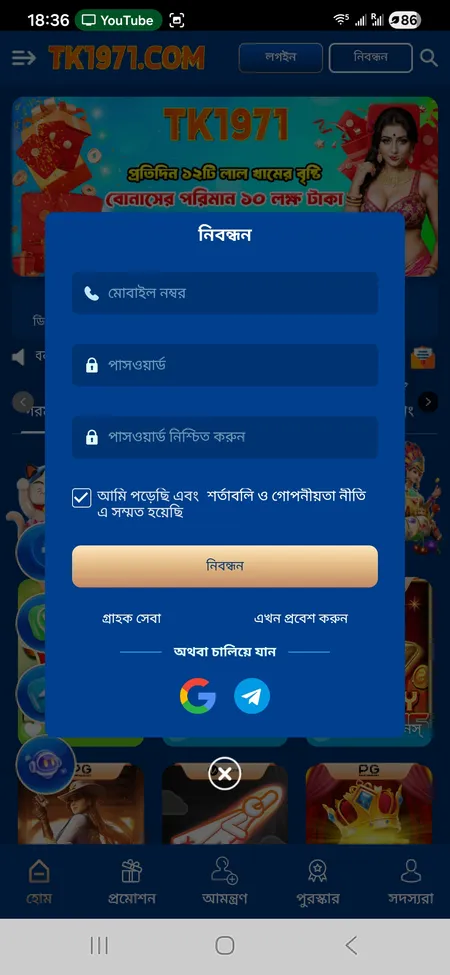
TK1971 registration form inside the app

Registration requires your Bangladeshi mobile number, password and confirmation. Google and Telegram login are also available.

Get the Official APK

iOS Installation - Web App Method

TK1971 does not have a dedicated App Store listing. iOS users have two practical options.

Option 1 - Add to Home Screen (PWA)

  1. Open tk1971game.com in Safari on your iPhone or iPad.
  2. Tap the Share icon (square with arrow) at the bottom of the screen.
  3. Scroll down and tap 'Add to Home Screen'.
  4. Name it 'TK1971' and tap 'Add'.

The icon appears on your home screen and opens in full-screen mode without Safari's address bar. Performance is close to a native app for most games.

Option 2 - iOS App via official link

Check the TK1971 download page for an iOS-specific link. When available, it installs via a configuration profile. After installing, go to Settings > General > VPN and Device Management and tap 'Trust' for the developer profile. This unlocks the app like any App Store install.

If iOS prompts 'Untrusted Developer', the trust step above resolves it. Do not download from unofficial sources.

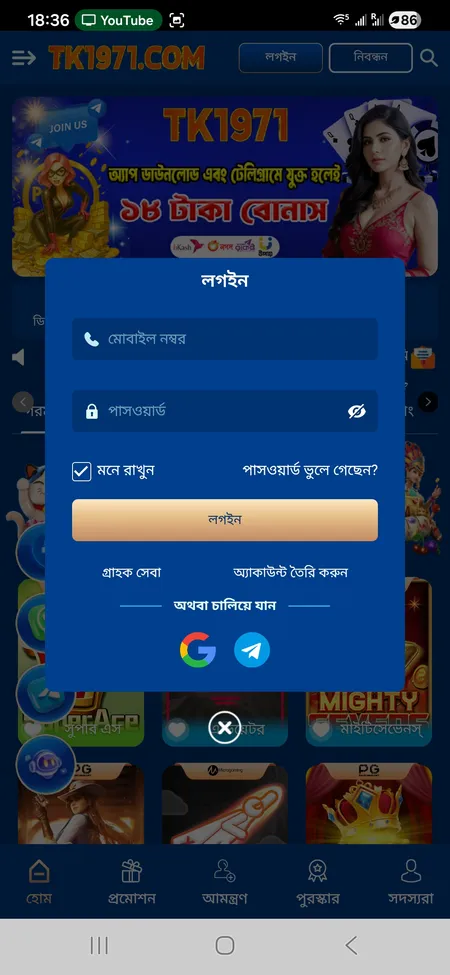
TK1971 login screen with mobile number and password fields

The login screen supports mobile number plus password, biometric login, and sign-in via Google or Telegram.

System Requirements

Requirement Android iOS
Minimum OS Android 6.0 iOS 13.0
Storage 150 MB free 100 MB free
RAM 2 GB recommended 2 GB recommended
Internet 3G minimum, 4G recommended 3G minimum, 4G recommended
Screen 5 inch or larger 5 inch or larger

Most smartphones released after 2018 meet these requirements. Older low-end Android devices running 5.x may not support all live casino features smoothly.

Play on TK1971 Now

Bonuses Available in the App

The TK1971 app unlocks a specific welcome bonus that the desktop browser does not display as prominently.

App download bonus: 18 BDT credited when you download the app and join the official TK1971 Telegram channel. No deposit required for this specific amount.

First recharge activity: Make your first deposit of 100 BDT and receive up to 82% rebate plus the 18 BDT app download bonus, giving a combined bonus of up to 100 BDT. Maximum bonus under this promotion is 3,000 BDT. Wagering requirement is 10x and the bonus applies to slots only.

Daily missions inside the app: The missions screen (accessible from the bottom menu under Reward) shows valid bet milestones. Reaching 100 BDT in valid bets unlocks the first milestone reward. The Ramadan Wishing Wheel and daily cash bonuses are tied to in-app activity.

VIP upgrade bonus: Effective bets accumulate toward VIP levels. VIP1 requires 1,000 BDT in effective bets and triggers an automatic upgrade bonus. Higher VIP levels receive weekly and monthly bonuses paid through the Reward Center.

You can learn more about all active promotions on the TK1971 bonus and promo page.

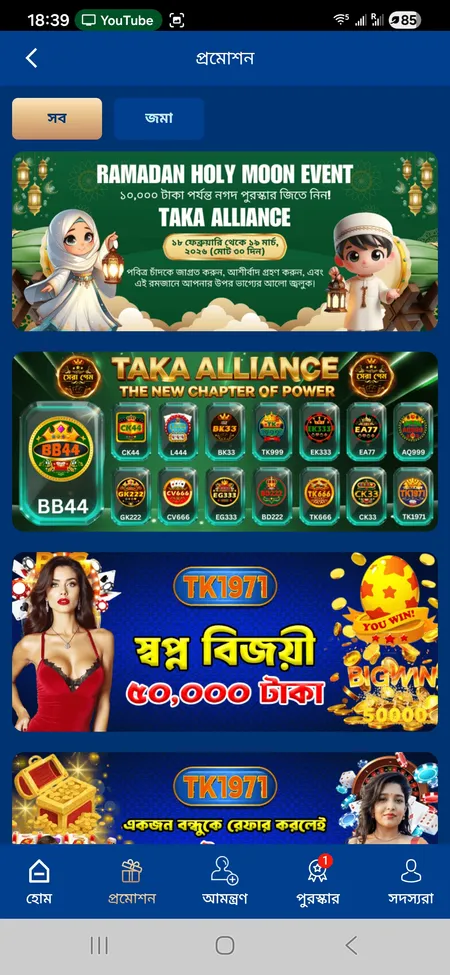
TK1971 promotions screen showing Ramadan bonus and Dream Winner offer

The promotions tab displays seasonal offers including Ramadan bonuses, Dream Winner 50,000 BDT daily prize and the Refer a Friend program.

See All TK1971 Bonuses

Games Inside the TK1971 App

The full catalogue of 24,000+ games is available in the app across six main categories.

The app organises games by category in the bottom navigation and sidebar:

  • Slots - JILI, PG, Pragmatic Play, Microgaming, NetEnt and 20+ more providers
  • Live Casino - Evolution Gaming, Sexy Casino, Ezugi; tables include Baccarat, Teen Patti, Andar Bahar, Roulette, Blackjack
  • Sports - Cricket, e-sports and other markets via 9 Wickets, SABA Sports, FB Sports and IA E-Sports
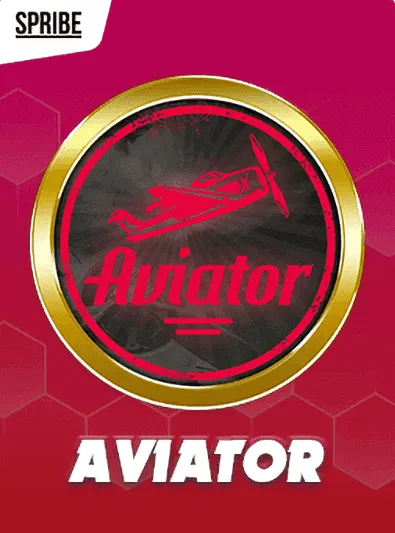
  • Crash games - Aviator by SPRIBE is the flagship; accessible from Hot Games
  • Fishing - JILI, JDB, CQ9, Joker arcade-style games
  • Poker and Lottery - JILI Poker, Kingmaker, and daily lottery draws

The search bar at the top of each category tab lets you find any title by name without scrolling.

Deposits and Withdrawals in the App

The payment section is under the 'Deposit' shortcut in the top quick-action bar. All transactions run in BDT (Bangladeshi Taka).

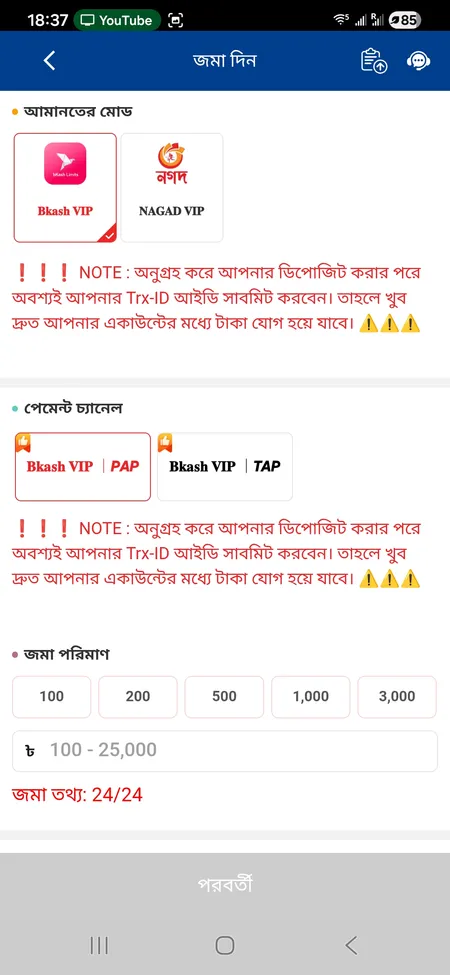
TK1971 deposit form inside app

Deposit Methods

bKash VIP, Nagad VIP, Rocket, Upay, bank transfer and cryptocurrency. Minimum deposit: 100 BDT. Maximum per transaction: 25,000 BDT. After transferring from your mobile wallet, enter the Transaction ID (Trx-ID) in the app form. Without the Trx-ID the funds will not credit to your account.

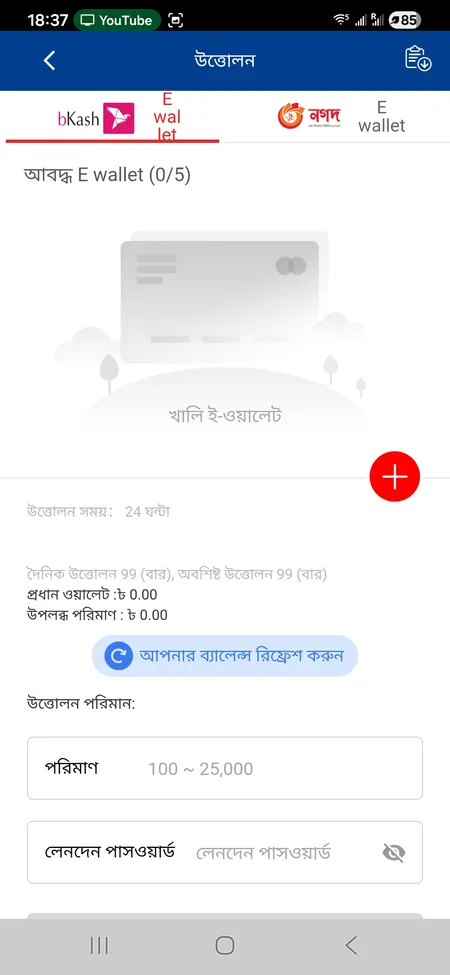
TK1971 withdrawal form inside app

Withdrawal Process

Minimum withdrawal: 100 BDT. Maximum: 25,000 BDT per transaction. Up to 99 withdrawals per day. Link up to 5 e-wallets (bKash or Nagad). Processing time: up to 24 hours. A transaction password is required for each withdrawal. Your profile name must match the name on the payment account.

Payment method icons

Method Type Min
bKash bKash Mobile wallet 100 BDT
Nagad Nagad Mobile wallet 100 BDT
Rocket Rocket Mobile wallet 100 BDT
Bank Transfer Bank Transfer Bank Varies

Never send money to an agent based on a request received in a private message. Only use the official deposit form inside the app.

Deposit and Start Playing

Account Security in the App

TK1971 uses SSL encryption on all connections between your device and the server. The app supports 2FA as an additional layer - enabling it means a code is required alongside your password at login. Biometric login (fingerprint or Face ID) is a convenient alternative once the account is set up.

Key security rules to follow:

  • Use a unique password not shared with any other service
  • Enable biometric login to avoid typing your password on shared devices
  • Only deposit through the in-app form, never via direct wallet-to-wallet transfer based on chat requests
  • One account per person - using multiple accounts from the same device or IP triggers the fraud detection system and can result in account suspension

If you lose access to your account, contact 24/7 support via Telegram, WhatsApp or the in-app chat. Recovery is handled by the support team.

You can complete your account setup and verification from the TK1971 registration page.

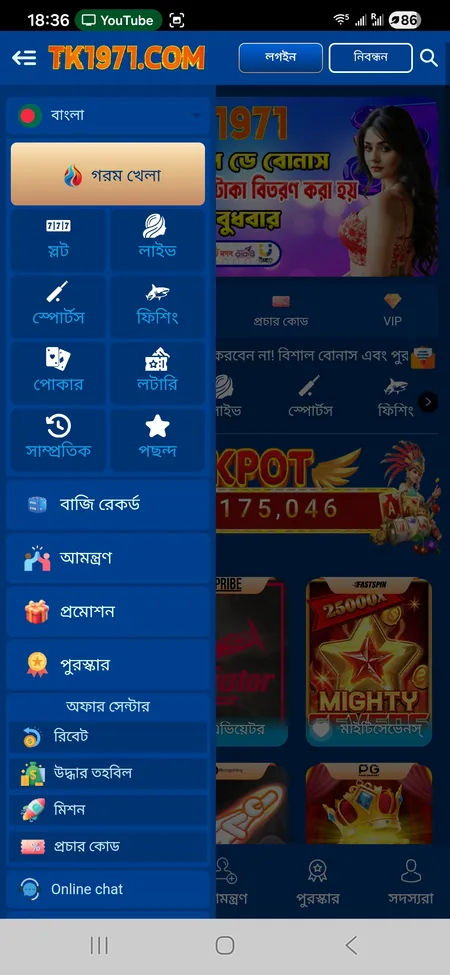
TK1971 app sidebar menu with game categories and settings

The sidebar gives access to all game categories, rebate, missions, invite friends, promo codes and customer service.

Keeping the App Updated

TK1971 does not use automatic updates through an app store. When a new version is released, you will see a prompt inside the app or receive a notification via the official Telegram channel. To update:

  1. Download the new APK from tk1971game.com or tk1971.org.
  2. Install it over the existing app - your account data and balance are stored on the server, not locally, so nothing is lost.
  3. For iOS PWA, clearing the Safari cache and reloading the site refreshes the web app to the latest version.

Staying on the current version ensures you have the latest game catalogue and security patches.

Frequently Asked Questions

Where do I download the official TK1971 APK?

From the official domains tk1971game.com or tk1971.org only. The app is not on Google Play. Third-party APK sites are not authorised.

Why is Android blocking the TK1971 app install?

Android requires you to allow installs from unknown sources. Go to Settings, find your browser app under 'Install unknown apps', and toggle it on. Then retry the install.

Is there a TK1971 app for iPhone?

Yes. You can add tk1971game.com to your home screen via Safari (Share > Add to Home Screen) for a PWA experience. A native iOS app link may also be available on the download page.

Does the app cost anything to download?

No. The APK and iOS web app are free. You receive 18 BDT just for downloading the app and joining the Telegram channel.

Can I use the same account on both the app and the website?

Yes. Your mobile number, password, balance and history are shared across all access points.

How long does the first deposit take to appear in the app?

Deposits via bKash and Nagad typically reflect within 1 to 5 minutes after you submit the correct Trx-ID in the deposit form.

What is the minimum withdrawal amount in the app?

100 BDT. The maximum per transaction is 25,000 BDT, and you can make up to 99 withdrawals per day.

Does the app support Bengali language?

Yes. The interface defaults to Bengali with full Bengali-language customer support available 24/7 via Telegram and in-app chat.

Will my app data be lost if I reinstall?

No. Account data, balance and history are stored on TK1971 servers. Reinstalling only affects the local app file.

How do I contact support from inside the app?

Tap the chat icon (floating robot icon) on the home screen, or go to the sidebar menu and select Online Chat. Support responds within 2 to 5 minutes.

Download the TK1971 app, claim your 18 BDT welcome bonus, and start playing with bKash or Nagad in minutes.